
The Morning AWS Told Us We Owed $502 Billion
When your cloud console shows a number with eleven digits
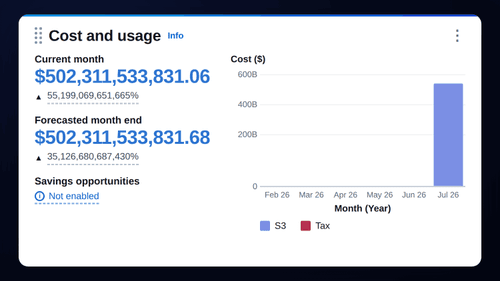
It was early Friday when one of our clients pinged us, half-laughing and half-terrified: their AWS Cost and Usage panel was showing a current-month bill of $502,311,533,831.06. Not a typo. Just over half a trillion dollars — with a month-over-month change of 55,199,069,651,665%.
For a few minutes, nobody was laughing.
Our first instinct was the wrong one
We'll be honest, because that's more useful than pretending we stayed calm. The first thought wasn't “this is a bug.” It was: “Have we been hacked? Is someone spinning up thousands of instances on this account right now?”
So we did what a lot of teams do in that first adrenaline minute — we started locking things down. Rotating access keys. Resetting the root password. Getting ready to disable IAM users. Halfway through, one of us stopped and said the sentence that saved the morning: “Wait — let's check the AWS status page before we break our own production.”
Then we saw the announcement
Sure enough, AWS had already posted it. The Billing and Cost Management Console — and Cost Explorer with it — was displaying inaccurate estimated billing data. In their own words:
Beginning on July 16 7:38 PM PDT, we began displaying incorrect estimated billing data in the Billing and Cost Management Console. Our engineering teams are engaged and investigating root cause.
No breach. No runaway workload. No $502 billion. Just a display-layer glitch in the estimation pipeline that feeds the cost dashboards. The actual resources — the S3 buckets, the compute — were doing exactly what they always do. The number on the screen was fiction.
You can always confirm this kind of thing yourself at the official AWS Health status page — worth bookmarking before you ever need it.
The official timeline
- Jul 16, 7:38 PM PDT — incorrect estimated billing data starts showing in the Billing & Cost Management Console.
- Jul 17, ~1:33 AM PDT — AWS confirms it is investigating Cost Explorer showing inaccurate estimated data.
- Jul 17, ~2:07 AM PDT — “Service impact: Inaccurate Estimated Billing Data,” engineering engaged, next update promised.
What you should actually do before you panic
Here's the calmer playbook we wish we'd run from minute one. None of it is exotic — it's just the order that keeps you from turning a cosmetic glitch into a real outage.
- Check the status page first, act second. Before you touch a single key, open the AWS Health status page. A large share of “we got hacked!” moments are provider-side incidents, and 30 seconds of reading saves an hour of cleanup.
- Separate “estimated” from “billed.” Cost Explorer and the console's estimated figures are projections, not an invoice. Your real, finalized charges live in your billing invoices — not in a live-estimating widget that can misfire.
- Look at CloudTrail, not the cost number. If you're genuinely worried about compromise, the truth is in CloudTrail and your API activity — new IAM users, unfamiliar regions spinning up, unusual API calls. A scary cost figure with a quiet CloudTrail is almost never a breach.
- Don't rotate everything mid-panic. Blindly killing keys and IAM roles while production depends on them can cause the exact outage you were afraid of. Rotate deliberately, when there's evidence — not reflexively, on a number.
- Set alarms that mean something. AWS Budgets and Cost Anomaly Detection give you signals grounded in your baseline. A good anomaly alert would have told us “this is 55 trillion percent off baseline — this is not physically real,” which is a very different message from a raw dollar figure.
The calmer takeaway
The genuinely useful lesson wasn't about AWS. It was about us. A single unexpected number sent an experienced team straight toward drastic action — and the thing that protected the client wasn't a tool, it was a habit: verify before you react.
That habit is exactly what we try to build into the systems we ship — observability that tells you not just what changed but whether it's real, alerts calibrated to a baseline instead of a raw threshold, and runbooks that put “check the status page” ahead of “rotate the keys.” It's the same thinking behind Koordex, our AI operations layer: less noise, more signal, and a clear next action instead of a blinking red number.
If half a trillion dollars taught us anything, it's that the scariest part of infrastructure is rarely the infrastructure. It's the ten minutes of human panic before someone says “let's check first.”
Whether you're building for an Istanbul-based team or a global one, that pause is worth engineering in. If you'd like a second set of eyes on your cloud setup — cost alarms, observability, incident runbooks — tell us about your project and we'll help you make the calm response the default one.